

What is PopClip?
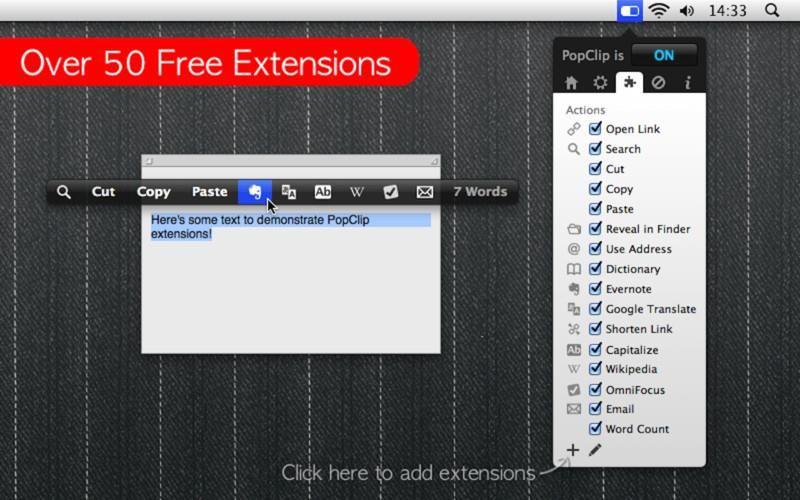
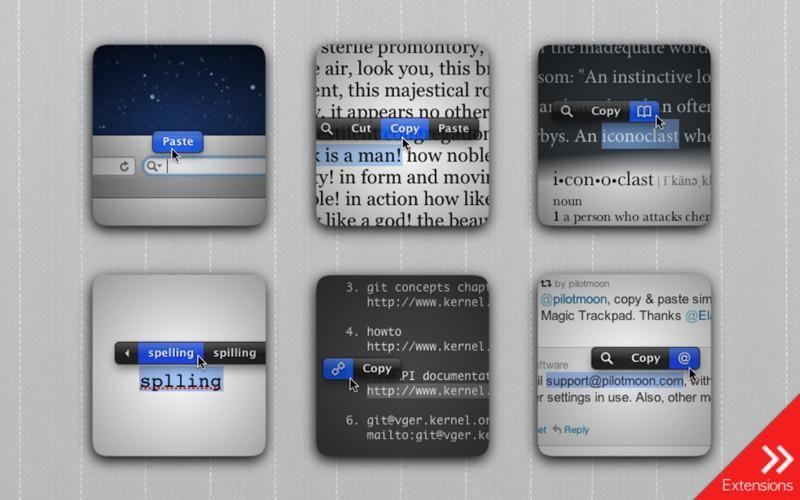
The PopClip app for macOS provides a versatile pop-up menu that enhances the functionality of text selection on your computer. When you highlight text with your mouse, PopClip instantly appears, offering a range of context-specific actions and extensions to streamline common tasks. Whether you need to copy and paste, open a URL, check a definition, or leverage specialized tools like Evernote integration, PopClip puts these capabilities right at your fingertips. The app can detect various text elements, such as URLs, email addresses, and file paths, and present relevant options accordingly. Additionally, PopClip offers spell check suggestions for misspelled words and the ability to perform web searches using the selected text. With over 50 free extensions available, users can further expand the app's functionality to suit their specific needs, accessing features like Paste and Match Style, Translate, Word Count, and more. PopClip's intuitive design and versatile feature set make it a valuable productivity tool for Mac users who frequently interact with text-based content
Highlights
- Context-specific actions triggered by text selection, including copy/paste, opening URLs/emails/files, and spell check
- Integration with popular apps and services like Evernote
- Web search and dictionary lookup capabilities based on selected text
- Extensibility through a wide range of free add-ons to customize functionality
Features
Context Menu extension
Extensible by Plugins/Extensions